

Board Vacancy in Trustee Area B - March 27, 2026
Following the resignation of Trustee Mrs. Jasmine Park of February 18, 2026 the Torrance Unified School District (TUSD) is looking to fill a vacancy on its five-member Board. Education Code sections 5091 et seq. and Board Bylaw 9223 set forth the procedures to fill a Board vacancy. In order to serve on the Board, a person must meet the eligibility requirements specified in Education Code section 35107 (see below). During the February 17, 2026 Board meeting, the Board of Education discussed a provisional appointment to fill the Board Vacancy. The term of the provisional appointment is through December 14, 2026.
Applications will be accepted until 4:00 p.m. on Friday, March 27, 2026. See below for more information.
If you are interested in learning more about serving as a School Board Member, you are invited to attend one of the upcoming Public Information Zoom meetings where you can speak with 1-2 current Board Members. These meetings will be held on Monday, March 23, 2026 at 3:00 pm, and on Tuesday March 24, 2026 at 6:00 pm. If you are interested in joining one of the zoom meetings, you can email morse.shelley@tusd.org to receive the link.
Information for Interested Candidates:
Download and print the Board Member Application.
Complete and sign the application and submit it in person at the Superintendent's Office (2335 Plaza Del Amo, Torrance 90501) or by email to morse.shelley@tusd.org no later than 4:00 p.m. on Friday, March 27, 2026.
- The candidate must be at least 18 years of age
- The candidate must be a resident of Torrance, Trustee Area B (and remain a resident for the duration of the term)
- The candidate must be a citizen of California
- The candidate must be a registered voter
- The candidate must not be disqualified from holding a civil office
- A person who is not disqualified by the Constitution or laws of the state from holding a civil office (see above)
- Eligible to be elected or appointed a member of a governing board of a school district without further qualifications
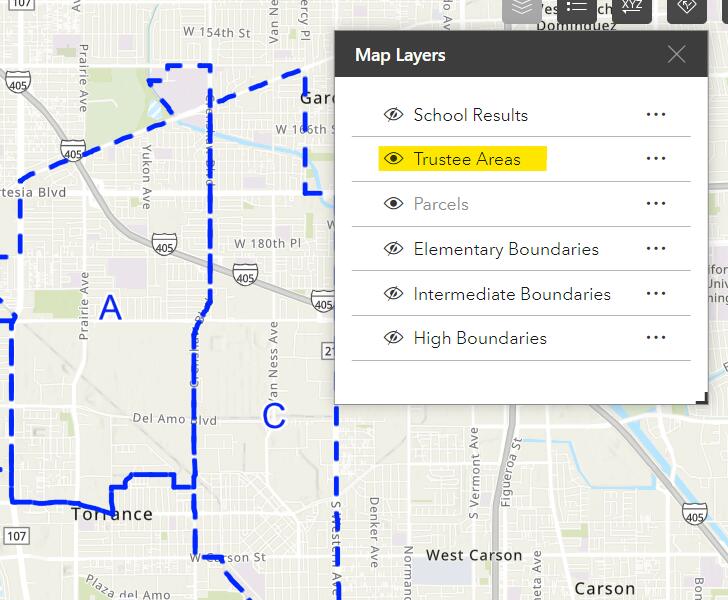
- Interested candidates can use the Interactive School Locator.
- Be sure to select the "Trustee Area" (highlighted in yellow below) by making sure the eye icon is open, and turn off all the other layers.
- Then zoom in to the street level and check your address.
This site provides information using PDF, visit this link to download the Adobe Acrobat Reader DC software.